Introduction to Google AdWords Keyword Planner
If you want to win at SEO or dominate Google Ads, keyword research is not optional—it’s essential. Think of keywords as the bridge between what people search for and the content or ads you show them. And when it comes to keyword research, one tool stands tall: Google AdWords Keyword Planner.
What Is Google AdWords Keyword Planner?
Google AdWords Keyword Planner (now officially called Google Ads Keyword Planner) is a free tool provided by Google that helps you discover keywords, analyze search volume, check competition, and estimate advertising costs. It’s designed mainly for advertisers, but SEO professionals use it heavily too.
Why Keyword Research Is the Backbone of SEO & PPC
Without keyword research, you’re basically shooting arrows in the dark. Keywords tell you:
- What people are searching for
- How often they search
- How competitive a keyword is
- How much advertisers are willing to pay
In short, keywords decide whether your content gets traffic—or stays invisible.
Understanding Google Ads Ecosystem
Difference Between Google Ads and SEO Keywords
SEO keywords focus on organic traffic, while Google Ads keywords target paid traffic. The interesting part? Both use the same search behavior. Keyword Planner sits right in the middle, serving both purposes.
How Keyword Planner Fits Into Google Ads
Keyword Planner helps advertisers:
- Find profitable keywords
- Estimate CPC (cost per click)
- Forecast ad performance
Even if you never run ads, this data is gold for SEO.
Prerequisites Before Using Keyword Planner
Creating a Google Ads Account
You need a Google Ads account to access Keyword Planner. Don’t worry—you don’t need to run ads or spend money.
Steps:
- Go to Google Ads
- Sign in with your Gmail
- Create an account (skip campaign setup if prompted)
Free vs Paid Access – What You Need to Know
The tool is free, but:
- New or inactive accounts see keyword ranges
- Active advertisers get exact search volume data
Still, even ranges are extremely useful.
How to Access Google Keyword Planner
Step-by-Step Login Process
- Log in to Google Ads
- Click Tools & Settings
- Go to Planning
- Select Keyword Planner
Navigating to Keyword Planner Tool
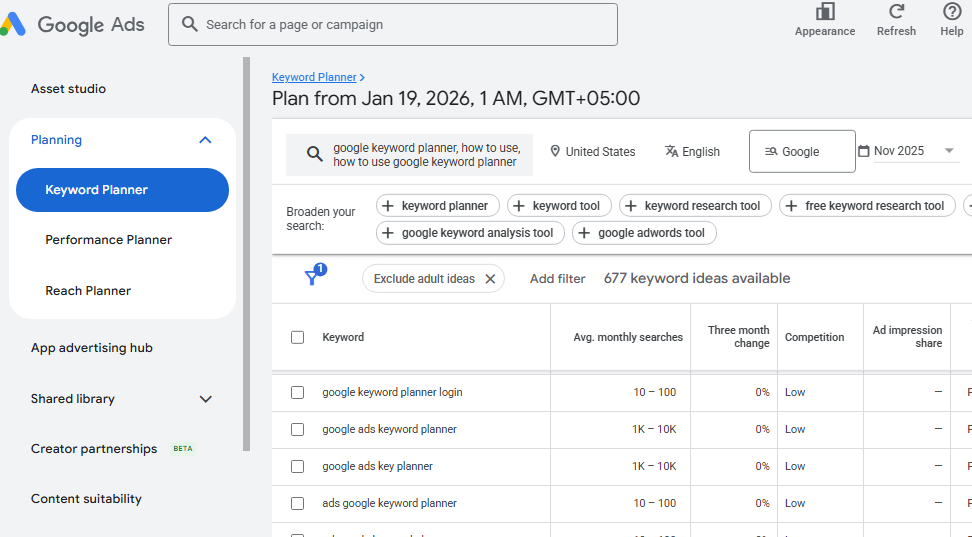
Once inside, you’ll see two main options:
- Discover New Keywords
- Get Search Volume and Forecasts
These are the heart of the tool.
Exploring the Two Main Features of Keyword Planner
Discover New Keywords
This option helps you find keyword ideas based on:
- Seed keywords
- Website URLs
- Product or service ideas
Get Search Volume and Forecasts
This feature shows:
- Monthly searches
- Expected clicks
- Cost estimates
Perfect for planning ad budgets or validating keyword demand.
How to Find New Keywords Using Keyword Planner
Using Seed Keywords
Seed keywords are basic terms related to your niche.
Example:
If your niche is fitness, try:
- weight loss
- home workout
- gym equipment
Google expands these into hundreds of related keywords.
Using Website URL for Keyword Ideas
Paste a competitor’s URL, and Google will scan it for relevant keywords. It’s like peeking into your competitor’s playbook.
Filtering Keyword Results Effectively
Use filters to remove:
- Brand names
- Irrelevant terms
- High competition keywords
This makes your list cleaner and more actionable.
Understanding Keyword Metrics in Detail
Average Monthly Searches
This shows how often people search for a keyword per month. High volume means demand—but usually higher competition.
Competition Level
Competition is labeled as:
- Low
- Medium
- High
Remember: this reflects advertiser competition, not SEO difficulty—but it’s still a strong indicator.
Top of Page Bid (Low & High Range)
This shows how much advertisers pay. High bids usually signal:
- Strong buyer intent
- Commercial value
How to Choose the Right Keywords
Short-Tail vs Long-Tail Keywords
- Short-tail: “shoes” (high volume, high competition)
- Long-tail: “best running shoes for flat feet” (lower volume, higher intent)
Long-tail keywords are easier to rank for and convert better.
Buyer Intent vs Informational Keywords
Ask yourself:
- Is the user learning?
- Or ready to buy?
Both matter—but buyer intent keywords make money faster.
Using Filters to Refine Keyword Research
Location Targeting
Choose countries, cities, or regions. This is crucial if your business is location-based.
Language Filtering
Target keywords in specific languages to avoid irrelevant traffic.
Excluding Irrelevant Keywords
Use negative keywords to clean your list. This saves time and improves accuracy.
Keyword Planner for SEO Strategy
Finding Low Competition Keywords
Look for:
- Medium search volume
- Low to medium competition
- Clear search intent
These are SEO sweet spots.
Content Planning Using Keyword Data
Use keywords to:
- Plan blog posts
- Optimize landing pages
- Create topic clusters
Your content becomes data-driven, not guesswork.
Keyword Planner for Google Ads Campaigns
Budget Planning
Keyword Planner helps estimate:
- Daily budget
- Monthly spend
- Potential ROI
No more blind spending.
Forecasting Clicks and Impressions
Forecasts show how your campaign might perform before you spend a single dollar.
Common Mistakes to Avoid
Relying Only on High-Volume Keywords
High volume doesn’t always mean high value. Sometimes small keywords bring bigger results.
Ignoring Search Intent
If your content doesn’t match intent, traffic won’t convert. Simple as that.
Practical Keyword Research Example
Real-Life Example Walkthrough
Let’s say your topic is “online Quran classes”:
- Enter seed keyword
- Filter by location
- Check CPC and competition
- Select long-tail keywords
Now you have keywords that actually convert.
Advanced Tips for Better Keyword Research
Combining Keyword Planner with Other Tools
Use it with:
- Google Trends
- Search Console
- Ahrefs or SEMrush
Cross-checking improves accuracy.
Seasonal Keyword Trends
Some keywords spike during certain months. Plan content early to stay ahead.
Benefits of Using Google Keyword Planner
Accuracy and Reliability
It’s Google’s own data—can’t get more reliable than that.
Free and Beginner-Friendly
No subscription, no learning curve. Perfect for beginners and pros alike.
Limitations of Google Keyword Planner
Data Ranges Instead of Exact Numbers
Unless you run ads, you’ll see ranges—but they’re still useful.
Competition Metrics Are PPC-Based
Don’t confuse ad competition with SEO difficulty. Use it wisely.
Final Thoughts
Is Google Keyword Planner Worth Using?
Absolutely. Whether you’re into SEO, blogging, affiliate marketing, or Google Ads, Google Keyword Planner is a must-use tool. It’s free, powerful, and straight from the source.
FAQs
1. Is Google Keyword Planner free to use?
Yes, you only need a Google Ads account—no payment required.
2. Can I use Keyword Planner for SEO?
Yes, it’s excellent for SEO keyword research and content planning.
3. Why does Keyword Planner show ranges instead of exact numbers?
Google shows ranges for inactive ad accounts.
4. What is the best keyword competition level to target?
Low to medium competition with clear intent is ideal.
5. Is Google Keyword Planner enough for keyword research?
It’s a great starting point, but combining it with other tools gives better results.