What Does It Mean to Run Google Ads?
To run Google Ads means creating paid advertisements that appear on Google’s search results, YouTube, and partner websites. These ads allow businesses to reach people who are already searching for related products or services. In simple terms, you pay to appear at the top when it matters most.
Google Ads works on a pay-per-click (PPC) model. That means you only pay when someone clicks your ad. This makes it a cost-effective and measurable marketing channel for businesses of all sizes.
When you run Google Ads properly, you’re not guessing. Instead, you’re targeting real users with real intent. That’s the magic of it.
Why Businesses Choose to Run Google Ads Today
There’s a reason millions of businesses run Google Ads every single day. It delivers results quickly and predictably.
Here’s why companies rely on it:
- Immediate visibility on Google
- Highly targeted audience reach
- Full control over budget
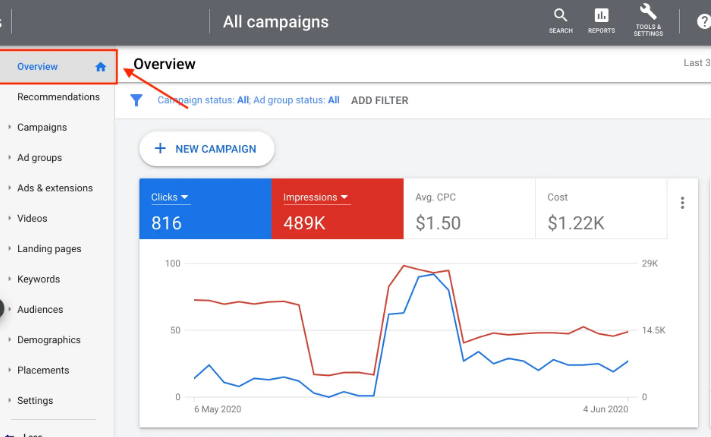
- Measurable performance data
- Works for both local and global markets
Unlike SEO, which takes time, Google Ads can generate traffic and leads almost instantly. For startups, service providers, and e-commerce brands, this speed is a game-changer.
How Google Ads Works: A Beginner-Friendly Explanation
Google Ads Auction System
Every time someone searches on Google, an auction happens in milliseconds. Advertisers who want to show ads bid on keywords. However, the highest bid doesn’t always win.
Google considers:
- Your bid amount
- Ad relevance
- Landing page experience
This ensures users see helpful ads, not just expensive ones.
Quality Score Explained
Quality Score is Google’s rating of your ads, keywords, and landing pages. It ranges from 1 to 10.
Higher Quality Score means:
- Lower cost per click
- Better ad positions
- Higher return on investment
If you want to run Google Ads efficiently, improving Quality Score is non-negotiable.
Types of Google Ads Campaigns
Search Ads
These appear on Google search results. They’re perfect for capturing high-intent users.
Display Ads
These visual ads show on websites, apps, and Gmail. Great for brand awareness.
Video Ads
Shown on YouTube. Ideal for storytelling and engagement.
Shopping Ads
Used by e-commerce stores to showcase products with images and prices.
Choosing the right campaign type is critical when you run Google Ads.
Step-by-Step Guide to Run Google Ads Successfully
Keyword Research Basics
Keywords are the backbone of Google Ads. Use tools like:
- Google Keyword Planner
- Ahrefs
- SEMrush
Focus on:
- Search intent
- Competition level
- Cost-per-click
Long-tail keywords often perform better and cost less.
Writing High-Converting Ad Copy
Your ad copy should:
- Match user intent
- Include the main keyword
- Highlight benefits
- Have a clear call-to-action
For example:
“Get Affordable Plumbing Services – Call Today!”
Landing Page Optimization
Sending traffic to a weak page wastes money. A strong landing page must:
- Load fast
- Match the ad message
- Have a clear CTA
- Be mobile-friendly
When you run Google Ads, landing pages matter more than ads themselves.
Budgeting and Bidding When You Run Google Ads
Start small. Test before scaling.
Common bidding strategies:
- Manual CPC
- Maximize clicks
- Maximize conversions
- Target CPA
Always track performance. Increase budget only on campaigns that show consistent results.
Common Mistakes to Avoid
Many advertisers fail because they:
- Target broad keywords
- Ignore negative keywords
- Skip conversion tracking
- Use poor landing pages
- Don’t optimize regularly
Avoid these pitfalls to save money and improve ROI.
Measuring Performance and ROI
Key metrics to monitor:
- Click-through rate (CTR)
- Cost per click (CPC)
- Conversion rate
- Quality Score
- Return on ad spend (ROAS)
Use Google Ads reports and Google Analytics for accurate tracking.
You can also refer to Google’s official guide:
👉 https://ads.google.com/home/how-it-works/
Advanced Tips to Run Google Ads Like a Pro
- Use ad extensions
- A/B test ad copies
- Schedule ads by time
- Optimize for mobile users
- Use remarketing campaigns
These strategies help experienced advertisers outperform competitors consistently.
Frequently Asked Questions (FAQs)
1. How much does it cost to run Google Ads?
Costs vary. You can start with as little as $5–$10 per day.
2. Is Google Ads better than Facebook Ads?
Google Ads targets intent, while Facebook targets interest. Both are powerful when used correctly.
3. How long does it take to see results?
Results can appear within hours, but optimization takes weeks.
4. Can beginners run Google Ads successfully?
Yes, with proper research and monitoring.
5. Do I need a website to run Google Ads?
In most cases, yes. Landing pages are essential.
6. Are Google Ads worth it in 2026?
Absolutely. When managed well, they deliver strong ROI.
Conclusion
To run Google Ads successfully, you need strategy, patience, and constant optimization. While the platform may seem complex at first, its potential is massive. Businesses that commit to learning and refining their campaigns consistently outperform those that don’t.
If you follow this guide step by step, test regularly, and focus on value, Google Ads can become one of your most profitable marketing channels.